

Table of Contents
A shop owner in Raipur gets 80 WhatsApp messages a day, and most ask the same three questions. A student in Bilaspur wants a side income but has no idea what to sell. Both lose hours every week to work a machine could handle.
That is exactly where an AI bot steps in. It answers questions, books appointments, collects leads and never takes a tea break. The best part is that learning how to build an AI bot no longer needs a computer science degree.
This guide walks you through the process using beginner-friendly tools, real business examples and honest expectations. If you prefer learning with a mentor, you can join a free demo class at We Cider Digital and try it live.
What Exactly Is an AI Bot?
An AI bot is a program that understands what people write or say and replies in a useful way. Old-style chatbots followed fixed menus, like "Press 1 for fees". Modern bots understand natural language, so a customer can simply type, "What is the fee for your evening batch?"
Businesses use them for customer support, lead capture, order updates, appointment booking and internal helpdesks. Marketers use them to reply to Instagram DMs and to qualify enquiries before a human steps in.
Skills like these are the heart of a good gen AI course or AI digital marketing course, because they save money for businesses and create paid work for you.
Who can build one?
- Students and fresh graduates looking for a high-demand skill
- Digital marketers who want to automate replies and follow-ups
- Coaching centres, clinics and shops tired of repeated questions
- Freelancers hoping to add a premium service to their menu
How to Build an AI Bot: 7 Practical Steps
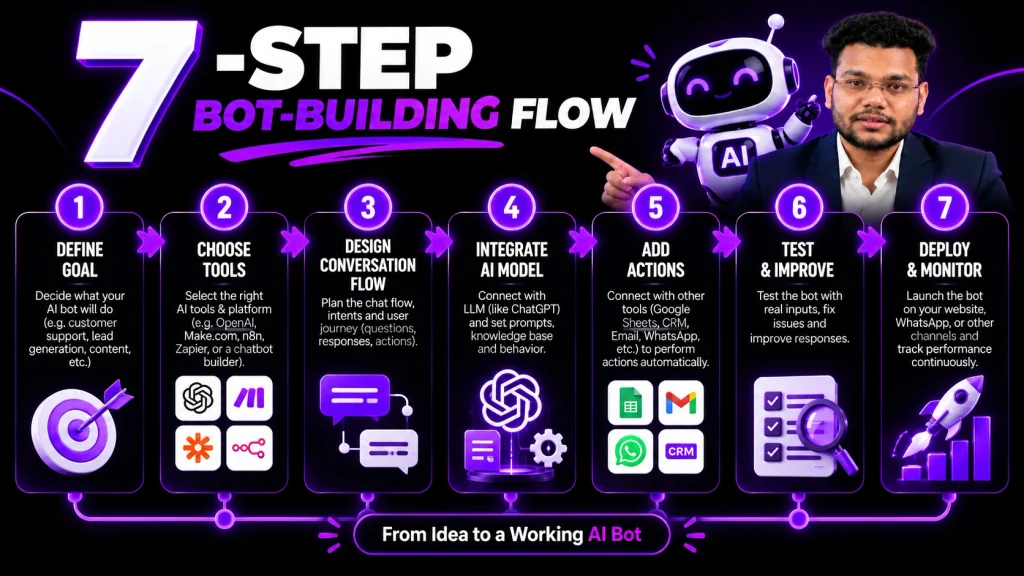
There is more than one route. Developers write code against an AI API, while beginners can use no-code tools. We will follow the no-code path, because it gets you a working bot fastest.
Step 1: Give Your Bot One Clear Job
Resist the urge to build a bot that does everything. Pick one task, such as answering admission queries or sharing product prices.
A narrow bot is easier to build, easier to test and far more reliable.
Step 2: Choose Your Platform
Your options depend on where the bot will live.
- Custom GPTs or Claude Projects: Quick for personal or internal assistants
- Zapier or Make: Best when the bot must connect with Gmail, Sheets, CRM or WordPress
- Website chatbot builders: Handy for adding a chat window to your site
- Python plus an AI API: For those who want full control later
Many of these offer free plans, so you can experiment before spending anything.
Step 3: Write the Instructions
Instructions, often called a system prompt, are the bot's job description. Tell it who it is, who it talks to, what tone to use and what it must never do.
For example: "You are the assistant for a coaching institute. Reply in simple Hinglish. If you do not know an answer, ask the user to leave a phone number."
Step 4: Feed It Your Knowledge
A bot is only as helpful as the information behind it. Upload your fee structure, FAQs, timings, brochures and policies.
Keep this material short, current and well organised. Outdated prices will lead to angry customers.
Step 5: Connect It to Where Customers Are
Now link the bot to a real channel: your website, WhatsApp Business, Instagram or email. An automation tool can also send each new lead into a Google Sheet or alert you instantly.
Note that some channels, especially WhatsApp's official business API, may carry platform charges. Check current pricing before promising anything to a client.
Step 6: Test Like a Strict Customer
Ask the bot silly questions, spelling mistakes, angry complaints and things outside its job. Ask a friend to try breaking it.
Every failure is useful. Fix the instructions or add the missing information, then test again.
Step 7: Launch Small and Keep Improving
Start with a limited audience. Read real conversations weekly, spot gaps and update the knowledge base.
Always give users an easy way to reach a human. A good bot knows when to hand over.
AI Course in Chhattisgarh: Duration, Fees and Mode
You can learn the basics from videos, but guided practice shortens the journey. Here is what quality training in Tier-2 cities usually looks like:
- Duration: Around 2 to 4 months
- Fees: Commonly ₹15,000 to ₹40,000 in this region
- Mode: Online, classroom or a mix of both
- Certification: Completion certificate along with project work you can show
Smart choice tip: Ask the institute to demonstrate a bot built by a past student. If they cannot, think twice.
What an AI Course Teaches You
- How AI models work, explained without jargon
- Prompt and instruction writing for reliable replies
- Building custom GPTs and knowledge-based assistants
- Workflow automation with Zapier and Make
- Lead capture bots for websites and social media
- AI content creation for marketing
- Connecting bots to Sheets, email and WordPress
- Pricing and pitching bot projects to clients
Coding is optional. Curiosity and regular practice matter more.
Careers and Income After Learning Bot Building
Once you know how to build an AI bot, you can work for a company or run your own small service business. Common paths in India include:
- AI automation specialist: roughly ₹4–8 LPA
- Chatbot and workflow builder: roughly ₹3.5–7 LPA
- AI-focused digital marketer: roughly ₹3–6 LPA
Salaries depend on your city, portfolio and the company. Freelancers often charge per bot or on a monthly maintenance basis, and many small businesses are glad to pay for a bot that saves staff time.
Few people locally offer this service today. That gap will not stay open forever.
Why Chhattisgarh Is a Good Place to Start
Local businesses in Raipur, Bilaspur, Durg and Korba are growing their online presence, but most still reply to customers by hand. That creates a steady supply of first clients for you.
You can also work for clients in bigger cities without moving, since bots are delivered online. Lower living costs mean early earnings feel bigger.
Why Learn with We Cider Digital?
We believe a skill is real only when you have built something with it. So our classes are project-first.
- Hands-on training: Build working bots, not just take notes
- Live projects: Create assets for your portfolio
- Placement support: Resume, interview and job lead guidance
- Freelancing guidance: Learn how to find and keep paying clients
- Certification: Proof of your training for employers
Picture showing your first client a bot that replies while they sleep. That moment changes how people see your skills, and your own confidence too.
Want to try it yourself? Enroll Now or Book a Free Demo Class.
Frequently Asked Questions
How to build an AI bot for free?
Start with free plans of custom GPT builders and automation tools. Free tiers have limits, but they are enough to learn and test.
Can I build an AI bot without coding?
Yes. No-code platforms let you create bots using plain-language instructions and uploaded documents.
How long does it take to build a basic AI bot?
A simple FAQ bot can be ready in a few hours. A polished one with integrations may take a few days.
Can an AI bot reply on WhatsApp?
Yes, through WhatsApp Business tools and automation platforms. Official access may involve charges and approvals.
Is there an AI course in Raipur or Bilaspur that teaches bot building?
Yes. Look for a course with live projects and a demo class so you can see the teaching style first.
Can I earn money by building bots for others?
Yes, many freelancers charge setup and maintenance fees. Income depends on your skills, portfolio and client reach.
Your Move
Building a bot is less about technology and more about clear thinking. Choose one problem, write good instructions, test hard and improve every week.
Anyone who learns how to build an AI bot today will be ahead of competitors still doing everything by hand. Start small, ship something, and let the results speak.
Ready to build your first one? Book your free demo class with We Cider Digital today.